
SERVER & DEVOPS SETUP
THAT KEEPS THINGS RUNNING
I help set up clean, secure and well-documented server environments for websites, tools,
dashboards, client portals and self-hosted business apps.


Server Setups Built Around Your Business
Whether you need a VPS, a dedicated server, a self-hosted tool stack, or a more bespoke deployment setup, I can help shape the technical foundation around the way your business works.
The goal is a setup that feels clear, reliable and easy to look after: sensible hosting, secure access, tidy deployments, useful monitoring, and documentation you can rely on.
From business websites to internal tools and self-hosted platforms, I help turn server infrastructure into something practical, maintainable and ready to support your next stage.

VPS & SERVER SETUP
Clean VPS, dedicated server and hosting environments prepared for websites, apps, tools and client systems.
SELF-HOSTED TOOLs
Setup for practical business tools such as dashboards, portals, automation systems, file managers and internal apps.
DEPLOYment & MAINTenance
Organised deployment flows, backups, monitoring and documentation to keep your setup clear and manageable.
Recent Server & DevOps Project
Hey Lorna – Self-Hosted Business Operating System
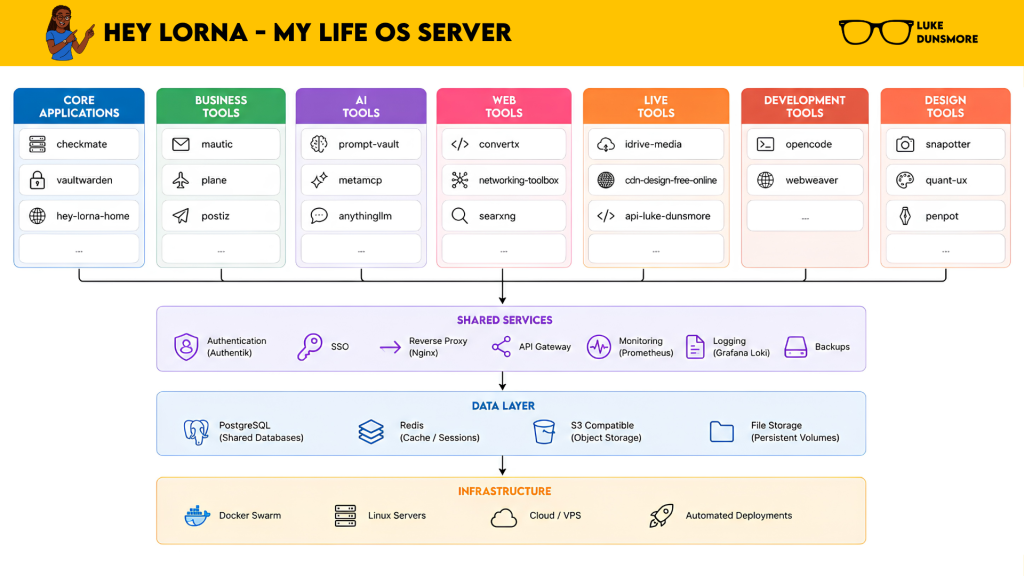
Hey Lorna is my own self-hosted server environment: a working VPS setup that runs websites, tools, dashboards, AI experiments, automations and internal systems from one carefully managed foundation.
It started as a practical way to organise my own digital workspace, then grew into a full server ecosystem covering hosting, deployments, monitoring, backups, authentication and self-hosted apps.
The project gives me a real-world testbed for the same kind of infrastructure thinking I bring to client work: clear structure, sensible tooling, secure access and systems that are built to be understood.
ORGANISED SERVER FOUNDATION
A structured VPS environment designed around tools, data, storage and future growth.
SELF-HOSTED Business TOOL STACK
Practical apps and dashboards brought together into a joined-up working environment.
DOCUMENTED DEVOPS WORKFLOW
Clear deployment habits, maintenance steps and technical notes at every step.
How I Help Businesses Like Yours
Set Up Your Server Foundation
Prepare the core hosting environment for websites, tools, apps and business systems.
KEEP ACCESS SECURE
Put sensible access, authentication and permission structures in place from the start.
ORGANISE YOUR DEPLOYMENTS
Create a clear, documented way to launch, update and manage digital projects.
PLAN BACKUPS & MONITORING
Create backup routines, uptime checks and visibility across all of your services.
SELF-HOSTED TOOLS
Set up tools for automation, dashboards, files, portals, AI workflows, internal operations or more.
DOCUMENT THE SETUP
Give you clear notes on what’s running, where it lives, and how the main pieces fit together.
How It Works
Every setup is different, but the way I work stays calm, practical and collaborative.
I look at what you need your server to support, how technical you want to be day to day, and what kind of setup gives your business the clearest path forward.
We talk through your websites, tools, hosting, apps, business needs and the kind of server setup that would support your work.
I map out the recommended structure: hosting, domains, access, apps, backups, monitoring and any key technical decisions.
I prepare the server environment with a clean structure, sensible folders, required services and the foundations your setup needs.
I deploy the agreed websites, tools or services, connect the essentials, and check everything is reachable in the right places.
I add the practical safeguards: secure access, backup routines, uptime checks and documentation for the key moving parts.
You receive clear handover notes, login guidance, and optional support for updates, extra tools and future improvements.
I explain things clearly, build with care, and keep the setup practical enough for real business use.
Ready To Take Control of Your Server Set Up?
Whether you need a new VPS, a dedicated server, self-hosted tools, or an easier way to manage your digital systems,
I can help you create a setup that feels steady, organised and ready to use.
Not sure what you need yet? No problem — we can start by looking at what you want your server to support.